APPLE 631-1339 Imac Emc Logic Board A1312 27-INCH 2390 IMAC11 820-2901-A
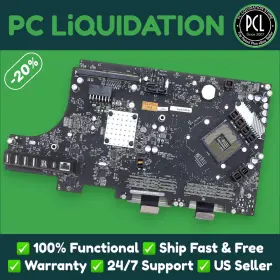
( Brand: Apple ), ( Manufacturer Part Number: 631-1339 ), ( Model: A1312 ), ( Color: Black ), ( Compatible Model: Imac, A1419 ), ( Form Factor: Imac ), ( Type: Logic Board ), ( Unit Type: Unit )
Review APPLE 27-inch Mid Emc Logic Board
Apple 27-inch iMac (2010) Logic Board - EMC 2390, A1312, Model Number IMac11, Part Number 820-2901-A
Description:This Apple 27-inch iMac (2010) Logic Board is an essential component of your iMac system, designed to connect and communicate between various parts of your computer. It carries the model number IMac11, the part number 820-2901-A, and the EMC number 2390. Additionally, it belongs to the A1312 revision.
Manufactured by Apple, this logic board is engineered with precision and high-quality components to ensure optimal performance and reliability. It is designed to fit perfectly in your 2010 27-inch iMac and can help resolve common issues related to system connectivity, display, and power.
The logic board is a complex circuit board that houses central processing units (CPUs), memory, storage controllers, and other essential components that enable the iMac to function. By replacing a faulty logic board, you can breathe new life into your 2010 iMac and restore its performance to its original specifications.
Key Features:- Model number: IMac11
- Part number: 820-2901-A
- EMC number: 2390
- Revision: A1312
- Designed for use in 27-inch iMac (2010)
- Engineered by Apple for superior performance and reliability
- Helps resolve common issues related to display, power, and connectivity
- Compatible with various components such as CPUs, memory, and storage drives.
Why Choose Our Apple 27-inch iMac (2010) Logic Board?
Our Apple 27-inch iMac (2010) Logic Board is a high-quality, genuine replacement component designed to meet the exact specifications of your iMac. It is tested and verified to ensure it functions perfectly, allowing you to enjoy a seamless computing experience once again. We take pride in our commitment to providing top-notch customer service and ensuring your satisfaction with every purchase.
Specifications:- Manufacturer: Apple
- Model number: IMac11
- Part number: 820-2901-A
- EMC number: 2390
- Revision: A1312
- Fits: 27-inch iMac (2010)
- Type: Logic Board
If you are experiencing issues with your 27-inch iMac (2010) and suspect that the logic board might be the culprit, our Apple 27-inch iMac (2010) Logic Board is the ideal solution. By upgrading to a new, genuine logic board, you can restore your iMac's performance and get back to using it for all your computing needs.
Buying a used Apple iMac 27-inch 2010 model with the logic board EMC 2390 and 820-2901-A component (Apple part numbers for a 2010 Logic Board and Power Supply respectively) can be a cost-effective solution for individuals who need a larger screen size for their computing needs but cannot afford a brand-new iMac. This model was released in 2010 and offers a 27-inch display, making it an attractive option for multimedia and design work.
Pros:1. Cost-effective: Purchasing a used iMac with a replacement logic board can save a significant amount of money compared to buying a brand-new iMac.
2. Large Display: The 27-inch display offers ample screen space for multitasking, writing, and editing.
3. Upgradability: The 2010 iMac has upgradable components, such as RAM and storage, allowing for customization based on individual needs.
Cons:1. Age: The 2010 iMac is relatively old, and its hardware may not support the latest software or be compatible with newer peripherals.
2. Potential Issues: Buying a used iMac with a replaced logic board carries the risk of encountering unforeseen issues or incompatibilities.
3. Limited Performance: The 2010 iMac's performance may not be sufficient for demanding tasks, such as video editing or 3D rendering.
Ending Conclusion:Buying a used Apple iMac 27-inch 2010 model with a replacement logic board can be a reasonable choice for those who require a larger screen and a decent computing experience without the high cost of a brand-new iMac. However, it's essential to be aware of the potential limitations and risks that come with purchasing a used computer.
Recommendation:Before making a purchase, ensure that the seller is reputable and trustworthy. Inspect the iMac thoroughly and test it with the necessary applications for your intended use. Consider purchasing a warranty or extended support plan from a trusted third party to mitigate potential issues. Additionally, consider upgrading the RAM and storage to ensure the best possible performance for your needs.
Details:
part #: 6311339 prices
- $19.12-$40.00
specifications powsuppy:
- brand: Apple
- mpn: 631-1339
- model: A1312
- color: Black
- compatible model: Imac, A1419
- form factor: Imac
- type: Logic Board
- unit type: Unit
seller powsuppy:
- city: Miami, Florida
- rating: 98.8%
- # reviews: 11272
shipping powsuppy:
- cost: $0.00
- carrier: USPS, FedEx
- type: Fixed
- service: USPS Ground Advantage, USPS Priority Mail, FedEx 2Day, FedEx Standard Overnight
- transit: 3-9 Days
- class: Standard, Expedited, One-day
payments powsuppy:
- credit card: Discover
- wallet: Paypal
- other
general powsuppy:
- condition: Used
- Computers/Tablet's Networking > Computer Components Parts > Power Supplies
offer powsuppy:
- options: Ship-to-home
- quantity: 1
- started: May 28, 2025
- sold: 0
- best offers: True
- availability: In Stock
returns powsuppy:
- time: 30 Days
- policy: Returns Accepted
- paid by: Seller
- method: Money back
Apple 631-1339 Is Similar To:
- Apple 661-7170 A1419 A2115 Imac Power Supply Unit 2012 2020 Psu Original With Screws (36.7% similar) Compatible with imac model's A2115 2019 , and A1419 from years 2012 , 2013 , 2014 , 2015 , 2017 , 2019 . Condition: authentic Apple part - used. Lifetime warranty for technical defects and component issues. Maximum wattage: 300W. Shipping: fast dispatch with secure packaging. Please verify...(May 18th, 2024)
- Apple 614-0416 Imac 24 Inch A1225 Replacement Power Supply 661-4478 661-4665 Pa-3241-02a2 (33.3% similar) Imac 24 A1225 replacement power supply - 661-4478, 661-4665, PA-3241-02A2, the power supply for the imac model A1225 is a critical component, and getting correct part essential compatibility performance. Manufacturer part number: 614-0416, 614-0405, 614-0432, PA-3241-02A2 this is often the...(May 19th, 2024)
- Apple Apa007 Imac 21.5 Inch A1418 2012 2013 2014 2015 2017 Power Supply 185w Tested (33.7% similar) Did a OS reinstall before I realized that the system couldn't be resold. If you don't want it, let me know. Machine has been parted and scrapped. It worked perfectly as well. It was tested and works perfectly. Fits many years. Pulled from working system with cracked screen and...(May 22nd, 2024)
- Delta 614-0445 Genuine Apple Imac 21.5 Inch 2009-2011 A1311 205w Power Supply Psu Oem (34.1% similar) No other accessories included. Comes as shown. Receive only what is pictured/listed. See condition above for more details...(May 27th, 2024)
- Apple 654538295843 Genuine Imac 24 Inch M1 143w Power Adapter Silver White A2290 (39.3% similar) Shipped with USPS priority mail. Only the shown item is included. Untested sold as is. Genuine Apple imac 24 m1 143W power adapter silver white A2290...(May 30th, 2024)
- Apple Pa231102a Genuine Imac 27 Inch 12v 310w Power Supply 614-0446 Pa-2311-02a Rev B Tested (34.3% similar) Genuine Apple imac 27 12V 310W power supply 614-0446 PA-2311-02A rev:b tested includes the ac emir filter...(June 1st, 2024)
- Apple 614-0403 Imac 20 Aio A1224 Psu Power Supply Unit Delta Electronics Mp-130i 614-0400 (36% similar) Apple imac 20 AI A1224 pus power supply unit delta electronics MP-130I 614-0400USED. In good working condition. MV8170D0F04QA...(July 4th, 2024)
- Apple 6140294 Imac G5 17 Inch Power Supply Tested 614-0327 From A1058 180w With Screw (38.1% similar) Recently pulled and cleaned. Working condition ready to be installed in your machine. Shipping via USPS. Power supply from Apple imac A1058...(July 8th, 2024)
- Apple 614-0444 Imac 21.5 Inch A1311 205w Power Supply (39.7% similar) It is compatible with imac and has a maximum power of 205 w, making it great choice for those who need powerful consistent source. The brand of this power supply is Apple, ensuring that you get a top-notch product built to last. The power module is designed in black and model number 614-0444...(July 11th, 2024)
- Apple Adp-85af 85w Ac Power Supply Psu Mac Mini Unibody A1347 Mid 2010 2011 Late 2012 2014 (40% similar) Original Apple power supply includes retainer clip and screw needed for install, can be seen in last picture. Each power supply was pulled from a working machine...(July 20th, 2024)
- Apple 661-7111 Imac A1418 Late 2012 Md093ll a 21.5 Inch Genuine 185w Power Supply (32.9% similar) Actual item pictured. Item has been gently removed from a working desktop imac A1418 late 2012 MD093LL/A tested to be in very good condition. Make the best deals with us...(July 26th, 2024)
